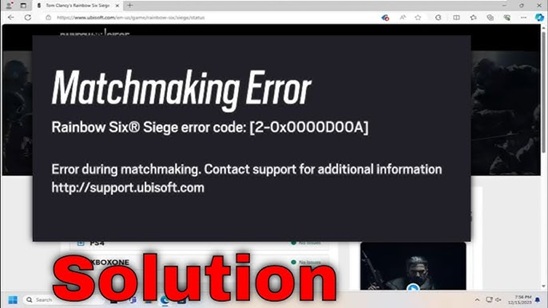
What Is the Rainbow Six Siege Matchmaking Error?
The Rainbow Six Siege matchmaking error occurs when players cannot connect to Ubisoft matchmaking servers. The issue can prevent users from joining Ranked, Quick Match, Standard, or Custom Games.
This error may appear after a game update, during server maintenance, because of network problems, or due to corrupted local game files.
Common Symptoms
- Infinite matchmaking queue.
- Unable to connect to matchmaking servers.
- Error while searching for matches.
- Frequent matchmaking disconnections.
- Ranked matchmaking unavailable.
Main Causes
| Cause | Description | Difficulty |
|---|---|---|
| Ubisoft Server Outage | Temporary server maintenance or downtime. | Easy |
| Network Issues | Packet loss, unstable Wi-Fi, ISP problems. | Medium |
| Strict NAT Type | Prevents proper matchmaking communication. | Medium |
| Corrupted Files | Broken local game files affecting connectivity. | Easy |
| Firewall Restrictions | Security software blocking Ubisoft services. | Medium |
How to Fix Rainbow Six Siege Matchmaking Error
1. Check Ubisoft Server Status
Server outages are one of the most common reasons matchmaking becomes unavailable. Wait until Ubisoft restores service if maintenance is ongoing.
2. Restart the Game
Completely close Rainbow Six Siege and reopen it. This refreshes server sessions and often resolves temporary matchmaking issues.
3. Verify Game Files
Corrupted files can cause communication problems with matchmaking servers.
4. Restart Your Router
Power off your modem and router for one minute before reconnecting.
5. Change DNS Servers
| Provider | Primary DNS | Secondary DNS |
|---|---|---|
| Google DNS | 8.8.8.8 | 8.8.4.4 |
| Cloudflare DNS | 1.1.1.1 | 1.0.0.1 |
6. Open Your NAT Type
Enable UPnP in your router settings or configure port forwarding to allow proper multiplayer communication.
7. Disable VPN Services
VPNs can interfere with Ubisoft routing and increase latency.
Expert Tips
- Use Ethernet instead of Wi-Fi whenever possible.
- Keep Rainbow Six Siege updated.
- Avoid background downloads during matchmaking.
- Update network drivers regularly.
- Use trusted DNS providers.
How to Prevent Future Matchmaking Errors
Maintaining a stable network connection and keeping your game updated significantly reduces matchmaking issues.
Regularly verify game files and avoid using unstable VPN connections while playing online multiplayer games.
Frequently Asked Questions
Why does Rainbow Six Siege keep searching forever?
The game may be unable to reach Ubisoft matchmaking servers due to outages or network problems.
Can DNS settings affect matchmaking?
Yes. Slow or unreliable DNS servers can affect connectivity and matchmaking performance.
Will reinstalling the game fix matchmaking issues?
If corrupted files are causing the problem, reinstalling can help.
Final Thoughts
Rainbow Six Siege matchmaking errors are usually caused by server outages, internet problems, NAT restrictions, or corrupted files. By following the troubleshooting steps outlined above, most players can restore matchmaking functionality and return to competitive play quickly.